Submission notes are private reminders and annotations you attach to individual form responses. They are ideal for tracking customer follow-up actions, logging call summaries, recording payment statuses, or adding context that does not belong in the form answers themselves.
Notes remain completely internal to your FormFinch account. Respondents never see them, and notes are never included when you export your submissions to Excel or CSV.
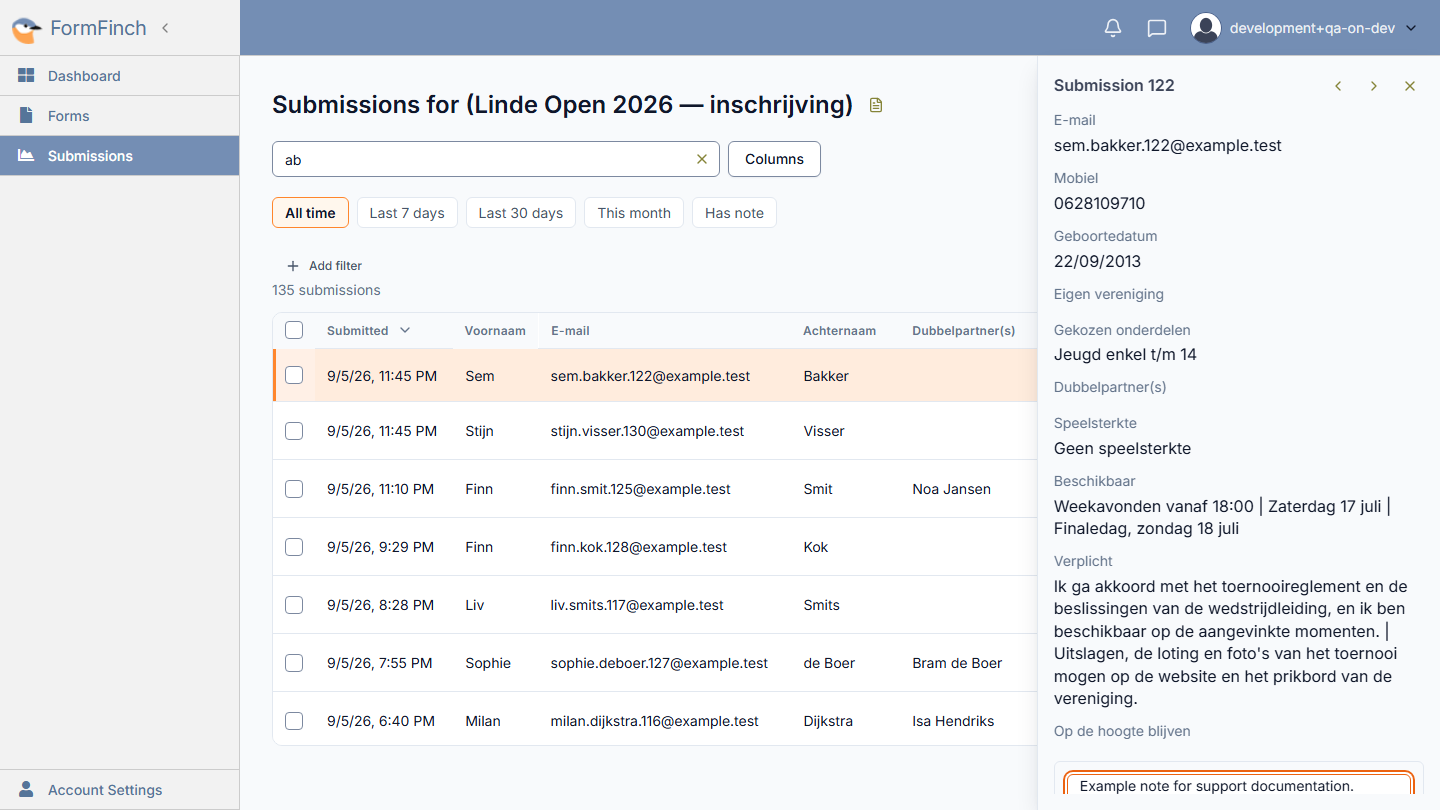
Add or edit a note
In FormFinch, notes are managed directly inside the submission detail drawer:
- Open your form’s submissions list from Forms > [Form Name] > Submissions.
- Click anywhere on the submission row you want to annotate. The detail drawer opens on the right side of the screen.
- Scroll to the bottom of the drawer to find the Note editor (with the placeholder Add a note to this submission.).
- Type your note text into the box.
- Click outside the text area or press Escape to finish. FormFinch automatically saves your note as soon as you leave the field.
To edit an existing note later, open the submission’s detail drawer again, update the text in the note area, and click away to save the changes.
Spot and filter notes in the grid
- Note indicator in the grid: When a submission has an attached note, a speech bubble icon appears in the Actions column of that row. This gives you a quick visual cue as you scan through submissions.
- Filter with Has note: Click the Has note chip in the filter bar above the grid to immediately isolate all submissions that contain a note.
Remove a note
To remove a note entirely:
- Open the submission row to bring up the detail drawer.
- Select all text in the note box and delete it.
- Click outside the note editor. FormFinch saves the empty field, removing the note and clearing the speech bubble icon from the grid row.
Privacy and data retention
- Private and secure: Notes are only visible within your FormFinch account. They are not visible to the respondent who filled out the form.
- Excluded from exports: When you export submissions to CSV or Excel (.xlsx), note contents are deliberately omitted to prevent internal comments from leaking into customer reports or data transfers.
- Deleted with the submission: If you delete a submission, its attached note is permanently removed at the same time.
One account, one set of notes
FormFinch accounts are currently single-user. All notes attached to submissions are visible to anyone logged into your account. If members of your team share account access, treat notes as shared internal memos.